MetaTrader 4 and MetaTrader 5 are free trading platforms by MetaQuotes Software Corp. They both offer demo accounts and are available through brokers. But, they meet different trading needs.
MetaTrader 4 was the first to launch and is loved by Forex traders. Its simple design makes it easy to start. MetaTrader 5, launched in 2010, has more markets, timeframes, order types, and tools.
This comparison will look at their main features, speed, access, and ease of use. The broker decides what assets are available. For example, FBS might offer Forex, metals, energies, stocks, and indices.
To trade live, a trader must open a broker account. This guide will help you decide between MetaTrader 4 and MetaTrader 5.
Overview of MetaTrader Trading Platforms

MetaTrader platforms are key for online trading. They offer tools for chart analysis, managing orders, and running automated strategies. They also have demo accounts. MetaTrader 4 is a hit with Forex traders, while MetaTrader 5 caters to a wider range of markets.
What is MetaTrader 4?
MetaTrader 4, or MT4, was launched five years before MetaTrader 5. It uses the MQL4 language and is mainly for Forex trading. It comes with 30 technical indicators, 31 graphical objects, and nine chart timeframes.
MT4 supports four pending order types and Fill or Kill execution. It allows hedging, demo trading, custom indicators, and automated trading tools. Its simple design and large user base make it a favorite for Forex trading.
What is MetaTrader 5?
MetaTrader 5, or MT5, is designed for trading various assets. It can handle Forex, stocks, futures, indices, and commodities, depending on the broker. It uses the MQL5 language, which offers a wider scope for advanced trading systems.
MT5 has more chart timeframes, technical tools, and order options than MT4. It includes market depth and supports both hedging and netting account models. These features are great for traders who need to access different markets from one platform.
Key Differences Between the Two
The main differences between MetaTrader 4 and MetaTrader 5 are in market coverage, programming, order handling, and chart tools. MT4 is more focused and familiar. MT5 offers a broader trading environment with deeper analysis features.
When comparing MetaTrader 4 and 5, consider the trader’s market, strategy, and broker support. The table below outlines the most important distinctions.
| Feature | MetaTrader 4 | MetaTrader 5 |
|---|---|---|
| Primary market focus | Forex trading | Forex and multiple asset classes |
| Programming language | MQL4 | MQL5 |
| Built-in indicators | 30 | 38 |
| Graphical objects | 31 | 44 |
| Chart timeframes | 9 | 21 |
| Pending order types | 4 | 6 |
| Account models | Hedging | Hedging and netting |
| Trading tools | Custom indicators and Expert Advisors | Custom indicators, Expert Advisors, and market depth |
User Interface Comparisons
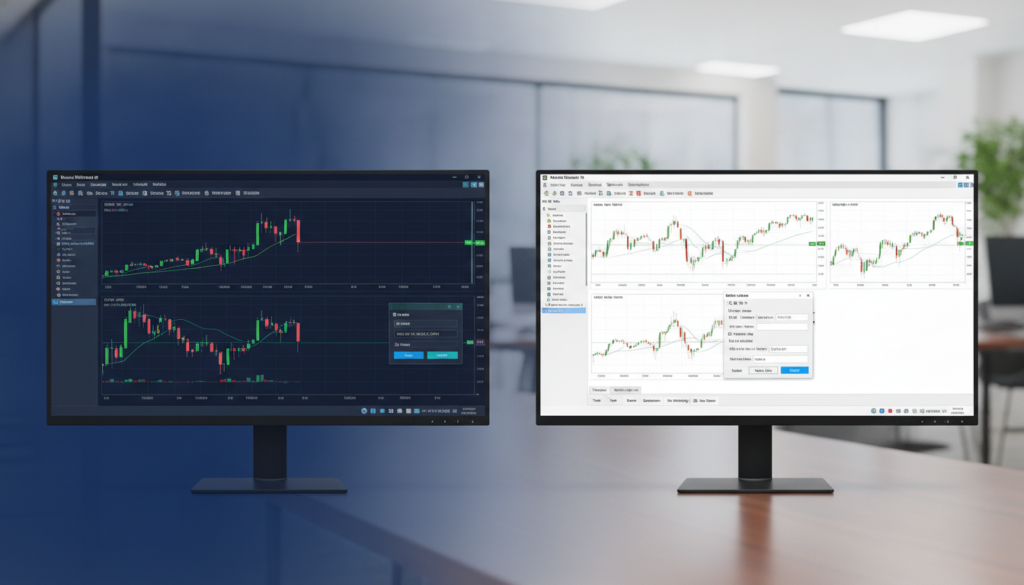
MetaTrader 4 and MetaTrader 5 have a similar trading layout. They both use market watch panels, chart windows, toolbars, and navigation menus. This makes it easy for users to switch between them.
The main difference is in the menu structure and the number of controls. This can impact how quickly a new trader learns the platform. Both platforms need an active internet connection for live prices and order management.
Layout and Design of MetaTrader 4
MetaTrader 4 has a simple and clean interface. Its Market Watch, Navigator, and Terminal panels make trading easy. Traders can open a chart, choose an instrument, and place an order quickly.
This design is great for beginners who prefer fewer controls. The platform also supports customizing the workspace. This lets traders adjust the layout while keeping it easy to understand.
Layout and Design of MetaTrader 5
MetaTrader 5 has the same core design but with more controls. Its menus offer more order settings, chart tools, and market information. This may take time to learn but supports a detailed trading routine.
Traders can resize panels, change chart views, and save templates. The shared layout makes comparing MT4 vs MT5 features easier during daily use.
Features and Functionalities of Each Platform

Choosing between MetaTrader 4 and MetaTrader 5 depends on what you need for trading. Both platforms support technical analysis and automated strategies. The broker settings can also impact what features you get.
Trading Instruments Supported
MetaTrader 4 is great for Forex. Brokers can add futures, stocks, options, or CFDs to certain accounts. The choice depends on the broker and market connection.
MetaTrader 5 offers a wider range of markets. It supports Forex, stocks, indices, commodities, futures, options, and exchange-traded assets. Some brokers even offer cryptocurrency markets. FBS, for example, lists Forex, exotic Forex, metals, energies, stocks, and indices among its assets.
| Platform | Common instruments | Access depends on |
|---|---|---|
| MetaTrader 4 | Forex, CFDs, and selected futures or stocks | Broker, account type, and market connection |
| MetaTrader 5 | Forex, stocks, indices, commodities, futures, options, and cryptocurrencies | Broker and supported exchange access |
Order Types Available
MetaTrader 4 offers market, limit, and stop orders. Traders can set stop-loss and take-profit levels. Pending orders help enter the market at a chosen price.
MetaTrader 5 has the same core order types as MetaTrader 4. It adds more pending order choices. This gives traders more control over entries during fast price moves.
- Market orders open a position at the available price.
- Limit orders target a better price than the current market level.
- Stop orders activate after price reaches a set level.
- Stop-limit orders combine a trigger price with a price limit.
Analytical Tools and Charts
Both platforms have live charts, technical indicators, drawing tools, and several time frames. Traders can study trends, support, resistance, and market momentum from one workspace.
MetaTrader 4 is known for its simple chart setup and large library of custom indicators. MetaTrader 5 offers more time frames, built-in indicators, and analytical objects. It includes an economic calendar, depth of market tools, and stronger support for exchange-based analysis.
For MetaTrader 4 or MetaTrader 5 for trading, the best chart package depends on the trader’s method. A Forex-focused user may prefer the familiar tools in MT4. A multi-asset trader may need the broader market data and order functions available in MT5.
Performance and Speed Analysis

Platform speed is key for trading quality, more so in fast markets. A MetaTrader 4 vs MetaTrader 5 comparison reveals both platforms rely on the broker’s servers and internet. The main difference lies in their testing systems.
Execution Speed in MetaTrader 4
MetaTrader 4 is known for stable execution in forex and simple automated strategies. Its design supports quick order entry on most setups.
Its strategy tester runs on a single thread, which can slow down long tests. This is true, like when an expert advisor checks years of price data. Complex rules or large historical periods can also slow results.
Execution Speed in MetaTrader 5
MetaTrader 5 is designed for faster, more efficient analysis. Its multi-threaded strategy tester uses several processor cores, speeding up demanding expert advisor research.
This platform supports multi-currency testing and real tick data. These features help traders test strategies across various instruments and recreate market activity with more detail. The MetaTrader 4 vs MetaTrader 5 comparison shows a clear advantage for automated trading.
| Performance area | MetaTrader 4 | MetaTrader 5 |
|---|---|---|
| Strategy tester design | Single-thread testing | Multi-thread testing |
| Currency testing | More limited testing workflow | Multi-currency testing |
| Historical data detail | Standard testing options | Real tick data support |
| Best fit | Simple forex strategies | Complex systems and multiple instruments |
Compatibility and Accessibility
MetaTrader 4 and MetaTrader 5 work on desktops, mobiles, and web browsers. This wide support lets traders manage their trades from anywhere. The choice between MetaTrader 4 and 5 depends on the device, operating system, and broker support.
Desktop Application Differences
Both platforms work on Windows, macOS, and Linux. They offer charts, indicators, automated trading tools, and account management. The main difference is in design and market support, not computer compatibility.
MetaTrader 4 has a classic layout, great for forex traders. MetaTrader 5 has a newer design with more market access through many brokers. It’s important to check if your broker supports the platform you choose.
Mobile Application Features
MetaTrader 4 and MetaTrader 5 mobile apps are available for Android and iOS. They allow users to view live prices, study charts, place orders, and manage trades. Push alerts help traders stay updated on price changes.
MetaTrader 5 mobile apps offer more tools, like market watchlists and chart periods. MetaTrader 4 apps are simple and fast, ideal for traders who prefer a clear screen.
Web Trading Capabilities
Browser trading means no need for a full desktop install. Both platforms work in Mozilla Firefox, Google Chrome, Apple Safari, Microsoft Edge, Opera, and Internet Explorer. This is great for traders using shared or work computers.
The web versions support basic tasks like chart review, order placement, and position monitoring. The availability of features can vary by broker and browser version. Confirming your broker’s supported devices and applications is key to choosing between MetaTrader 4 and 5.
Community and Support Resources
Good learning tools and quick support make trading better. MetaTrader 4 and MetaTrader 5 have guides, forums, code libraries, and broker help. These help traders learn from simple charts to complex strategies.
Availability of Educational Resources
Both platforms have lots of tutorials, manuals, and guides. MetaTrader 4 uses MQL4 for creating custom tools. It has many beginner lessons and examples.
MetaTrader 5 uses MQL5 for more advanced trading. Its learning center covers programming and strategy testing. Traders can learn from sample code before making their own tools.
User Community Engagement
MetaTrader 5 has a built-in MQL5.community chat. This lets users talk about trading tools and issues. MetaTrader 4 has a big user base but lacks this chat feature.
Many developers prefer MT4 for robots and Expert Advisors. This makes finding tools for MT4 easier. But, MT5 has fewer developers, limiting access to some tools.
Customer Support Options
Support often comes from the broker, not MetaQuotes alone. Traders can reach out through live chat, email, or phone. The quality of support varies by broker and account type.
The pros and cons of MetaTrader 4 and MetaTrader 5 are clearer when looking at support and tool access.
| Resource | MetaTrader 4 | MetaTrader 5 |
|---|---|---|
| Programming language | MQL4 | MQL5 |
| Learning materials | Wide range of guides and code samples | Detailed guides for advanced features |
| Community access | Large external user community | Embedded MQL5.community chat |
| Automated tools | Broad supply of Expert Advisors | Growing supply with fewer developers |
| Broker support | Usually available through the broker | Usually available through the broker |
Conclusion: Choosing the Right Platform
Deciding between MetaTrader 4 and MetaTrader 5 depends on your trading goals and experience. Both platforms offer reliable charting, automated trading, and mobile access. But, they differ in tools and market coverage.
Who Should Choose MetaTrader 4?
MetaTrader 4 is great for beginners and Forex traders who prefer a simple interface. It has a well-established MQL4 ecosystem with many indicators and expert advisors. It also offers learning resources.
It has fewer timeframes, tools, and order options. It doesn’t support netting or a built-in economic calendar in this comparison.
Who Should Choose MetaTrader 5?
MetaTrader 5 is better for traders needing broader market access and advanced analysis. It supports more instruments, timeframes, order types, and built-in research tools. Its Depth of Market feature and economic calendar help active traders make quicker, better decisions.
Final Recommendations
When deciding between MetaTrader 4 and MetaTrader 5, consider your trading plan. MetaTrader 4 is good for simple Forex trading. MetaTrader 5 offers more flexibility for long-term growth.
This guide shows that traders should compare broker support, preferred assets, and required tools before making a choice.